

Administrative assistants play an important role in keeping businesses organized and running smoothly. They handle schedules, manage communication, coordinate tasks, and support day-to-day operations. Because administrative roles exist in almost every industry, competition can be strong, which means your resume needs to show employers why you are the right fit.
Many job seekers make the mistake of creating a resume that simply lists previous duties. Employers already know that administrative assistants answer calls, schedule meetings, and organize files. What they really want to see is how you used your skills, solved problems, and contributed to the workplace.
This guide will walk you through an administrative assistant resume example, explain the important sections to include, and show you how to create a stronger resume that attracts attention.
What Employers Look for in an Administrative Assistant Resume
Administrative assistants often work as the support system behind daily business operations. Because of this, recruiters usually look for candidates who can handle multiple responsibilities while staying organized and professional.
Some qualities employers commonly look for include:
- Communication skills
- Time management
- Organization skills
- Attention to detail
- Problem-solving abilities
- Computer skills
- Multitasking ability
- Customer service skills
Your resume should demonstrate these qualities through examples rather than simply listing them.
Administrative Assistant Resume Example
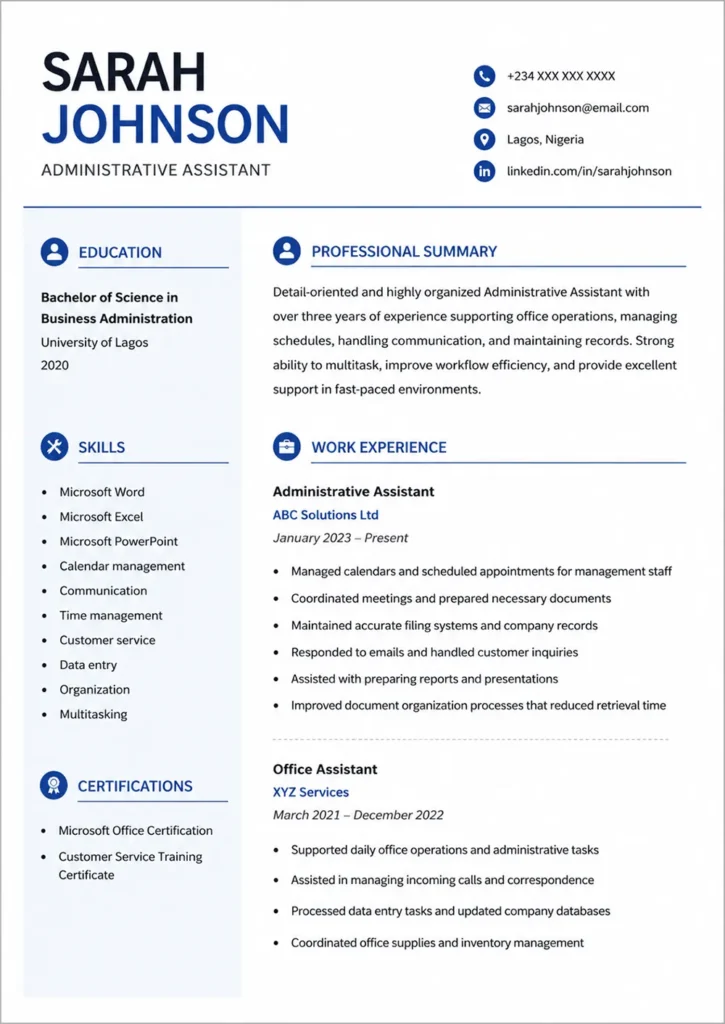
Text from the Example Resume Above
Sarah Johnson
Phone: +234 XXX XXX XXXX
Email: sarahjohnson@email.com
Location: Lagos, Nigeria
LinkedIn: linkedin.com/in/sarahjohnson
Professional Summary
Detail-oriented and highly organized Administrative Assistant with over three years of experience supporting office operations, managing schedules, handling communication, and maintaining records. Strong ability to multitask, improve workflow efficiency, and provide excellent support in fast-paced environments.
Work Experience
Administrative Assistant
ABC Solutions Ltd
January 2023 – Present
- Managed calendars and scheduled appointments for management staff
- Coordinated meetings and prepared necessary documents
- Maintained accurate filing systems and company records
- Responded to emails and handled customer inquiries
- Assisted with preparing reports and presentations
- Improved document organization processes that reduced retrieval time
Office Assistant
XYZ Services
March 2021 – December 2022
- Supported daily office operations and administrative tasks
- Assisted in managing incoming calls and correspondence
- Processed data entry tasks and updated company databases
- Coordinated office supplies and inventory management
Education
Bachelor of Science in Business Administration
University of Lagos
2020
Skills
- Microsoft Word
- Microsoft Excel
- Microsoft PowerPoint
- Calendar management
- Communication
- Time management
- Customer service
- Data entry
- Organization
- Multitasking
Certifications
- Microsoft Office Certification
- Customer Service Training Certificate
Why This Resume Example Works
A good administrative assistant resume does more than list responsibilities. It gives employers reasons to believe you can perform well in the role.
Several things make this example effective:
- The summary quickly explains experience and strengths
- Work experience focuses on contributions and responsibilities
- Skills are relevant to administrative work
- Information is organized clearly
- Formatting is simple and easy to scan
Recruiters often spend only a short amount of time reviewing resumes, so clarity matters.
How to Write an Administrative Assistant Resume Step by Step
Start With a Strong Professional Summary
The professional summary appears near the top of your resume and creates the first impression. It should briefly explain who you are, your experience level, and your strongest abilities.
Example:
“Organized Administrative Assistant with experience managing office operations, scheduling appointments, maintaining records, and supporting team productivity. Strong communication and multitasking skills with a focus on efficiency and customer service.”
Keep this section short and avoid writing personal objectives that focus only on what you want.
Instead of:
“Seeking a job to gain experience and improve my career.”
Focus on what value you bring.
Highlight Relevant Administrative Skills
Administrative roles often require both technical and soft skills. A good balance of both can make your resume stronger.
Common administrative assistant skills include:
Technical skills
- Microsoft Office
- Google Workspace
- Data entry
- Scheduling software
- Document management
- Email management
Soft skills
- Communication
- Organization
- Attention to detail
- Problem-solving
- Teamwork
- Time management
Avoid adding skills simply to fill space. Include only abilities you can confidently demonstrate.
Focus on Achievements Instead of Only Duties
One common mistake on resumes is listing daily tasks without showing results.
Less effective:
- Answered phone calls
- Organized files
- Scheduled meetings
Better:
- Managed an average of 50 daily customer inquiries while maintaining high service standards
- Improved filing systems for faster document access
- Coordinated schedules for multiple team members
Employers want to understand the impact of your work.
Administrative Assistant Resume Keywords to Include
Many companies use Applicant Tracking Systems, often called ATS, to scan resumes before a recruiter sees them.
Including relevant keywords naturally can help improve visibility.
Examples of useful keywords:
- Administrative support
- Scheduling
- Office management
- Data entry
- Customer service
- Calendar management
- Record keeping
- Communication
- Filing systems
- Microsoft Office
Do not force keywords into your resume repeatedly. They should fit naturally within your experience and skills.
Common Administrative Assistant Resume Mistakes
Even qualified candidates sometimes make avoidable mistakes.
Common issues include:
- Using generic summaries
- Listing responsibilities without achievements
- Including irrelevant skills
- Making the resume too long
- Using poor formatting
- Including spelling errors
- Using one resume for every job application
Customizing your resume for each role can improve your chances of getting noticed.
Tips to Make Your Administrative Assistant Resume Stronger
Small improvements can make a noticeable difference when employers compare candidates.
Helpful tips include:
- Keep your resume clean and organized
- Use consistent formatting
- Include measurable achievements where possible
- Match your skills with the job description
- Use bullet points for readability
- Save your resume as PDF before applying
- Review carefully for errors
Frequently Asked Questions
How long should an administrative assistant resume be?
For most candidates, one page is enough if you have limited experience. Those with extensive experience may use two pages if necessary.
Should I include references?
References are usually not necessary unless requested by the employer.
Can I apply for an administrative assistant job without experience?
Yes. You can include internships, volunteer work, projects, school activities, and transferable skills from other experiences.
Is Microsoft Office important for administrative assistant jobs?
Yes. Many employers expect administrative assistants to have basic to advanced knowledge of tools such as Word, Excel, Outlook, and PowerPoint.
Final Thoughts
A strong administrative assistant resume should show more than daily office responsibilities. It should demonstrate organization, communication skills, efficiency, and your ability to support business operations effectively.
Focus on presenting your experience clearly, highlighting relevant skills, and showing employers the value you can bring. Small improvements in structure and wording can often make a major difference when competing for interviews.
Ready to create your administrative assistant resume? Use our CV Builder to create a professional resume in minutes, customize the design, and download it instantly as a PDF.
